With the closure of the ATO Small Business Superannuation Clearing House, businesses can no longer submit superannuation payments through the ATO portal. Payments made after 1 July 2026 will not be accepted, even if they relate to payroll processed before 30 June 2026.
For businesses using QuickBooks Online (QBO), cancelled or unpaid superannuation contributions can be resubmitted using Beam Super Payments, providing a straightforward alternative for meeting super obligations.
Why a Super Payment May Be Cancelled
When paying superannuation via BPAY or Direct Debit in QuickBooks Online, payments cannot be manually cancelled. However, if a payment is not completed or remains unpaid, it will automatically cancel it after approximately 10 business days.
Once a payment has been cancelled, you’ll need to create a new Beam payment batch to resubmit the affected superannuation.
How to Resubmit a Cancelled Super Payment
Follow these steps to create a new Beam Super Payment batch:
- Open Payroll in QuickBooks Online.
- Navigate to Reports.
- Select Super Payments (located near the bottom of the report list).
- Locate the superannuation payment with a Cancelled status.
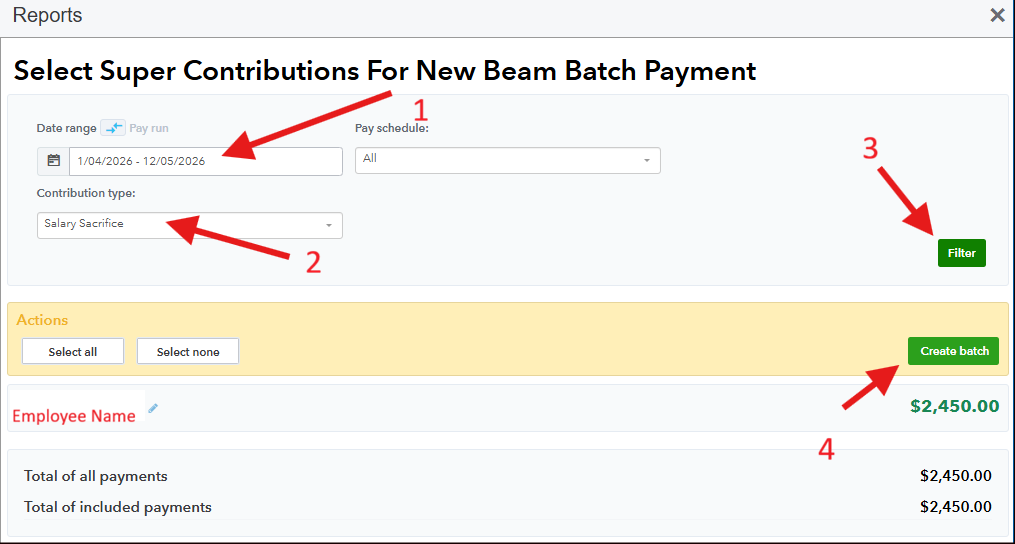
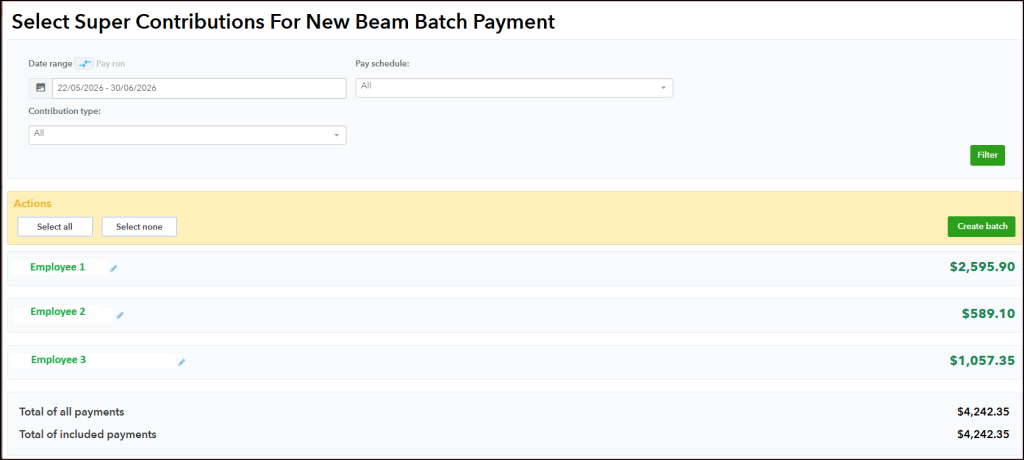
- Select New Super Payment Batch, then choose Beam.
- Select the payment date that contains the outstanding superannuation.
- Choose the pay run(s) you wish to include in the batch. You can also customise the payment by selecting only specific super components, such as Salary Sacrifice, if required.
- Review the payment details and confirm the total amount.
- Click Create Batch.
- Choose your preferred payment method:
- BPAY
- Direct Debit
- If you select BPAY, QuickBooks Online will generate a new BPAY biller code and reference for the replacement payment.
- After submitting the payment, you can monitor its progress by returning to the Super Payments report, where the payment status will be updated.

Example
If a client’s superannuation payment was cancelled because it wasn’t paid within the required timeframe, you can create separate Beam batches where appropriate. For example:
- Batch 1: Outstanding Salary Sacrifice contributions for an earlier pay period.
- Batch 2: Remaining employer superannuation contributions for later pay periods.
This approach provides flexibility and is similar to the superannuation payment process available in both Xero and MYOB.
Need Assistance?
If you’re unsure whether your superannuation payments have been affected by the ATO Clearing House closure or need help resubmitting cancelled payments in QuickBooks Online, the Cascade team is here to help.
We can assist with reviewing outstanding superannuation obligations, creating Beam payment batches, and ensuring your super payments are processed correctly and on time.